Authorization Overview - V2
These are instructions for connecting to the APIs using V2 Authentication. For V1 API Clients, please see Authorization Overview (V1)
Introduction
Authentication allows your application to securely access merchant data via the APIs.
Merchants need to authorize your API client to access their data using the OAuth2 authorization code grant flow.
The basic steps of the Authorization flow are:
-
Authorization Request: Provide the user with an authorization URL. The user clicks on the link, logs in, and consents to access. A
codeis returned to the redirect URI. -
Token Exchange: Capture the
codeand use it to send a request to the/tokenendpoint. Store theaccess_tokenandrefresh_tokenand their expiry times. -
Token Refresh: When the access token is close to expiring, send a request to the
/tokenendpoint with the latestrefresh_token. Store the newaccess_tokenand newrefresh_tokenand their expiry times.
Token expiry times should be monitored and managed dynamically
This article provides a general overview of the authorization flow. For a step-by-step walkthrough, see our Authentication Tutorial.
For information on obtaining an API Client, see Accessing the APIs.
The Authorization Flow
Obtaining an access token using the OAuth2 authorization code grant flow consists of the following steps:
1. Authorization Request
An authorization request is made when a Lightspeed Restaurant POS user clicks on a URL provided by the integrator.
The Authorization URL
Below are the URLs that should be used during the authorization process.
- The trial environment is used for development and testing of your application
- The production environment is used to connect your app to live merchant accounts.
API Clients are bound to the server they were issued for. This means that if you have a client for the trial environment, it will not work on the production environment. Likewise, if you have a production client, it will not work on the trial environment.
| Environment | Authorization URL |
|---|---|
| Trial | https://auth.lsk-demo.app/realms/k-series/protocol/openid-connect/auth |
| Production | https://auth.lsk-prod.app/realms/k-series/protocol/openid-connect/auth |
The following query parameters must be passed in the Authorization URL:
response_type(required) - Must becodefor the authorization code grant.client_id(required) - The unique identifier for the OAuth client.scope(required) - The access scopes being requested, space delimited (URL encoded).redirect_uri(required) - The URL that the user will be redirected to after authenticating and authorizing the integration.state(optional) - A unique string supplied by the external client that is persisted throughout the process to track the request.
Example Authorization URL
To connect to a merchant account on production, copy the following URL and replace the query parameter values with your own client ID, redirect URI, and scope(s). A state parameter can also be included, if desired.
https://auth.lsk-prod.app/realms/k-series/protocol/openid-connect/auth?response_type=code&client_id=DocumentationDemo-5745-4d30-8f1a-bd64511a62ed&redirect_uri=https://localhost&scope=financial-api%20orders-api&state=abcd123-efgh456
- This URL should be supplied to the Lightspeed merchant.
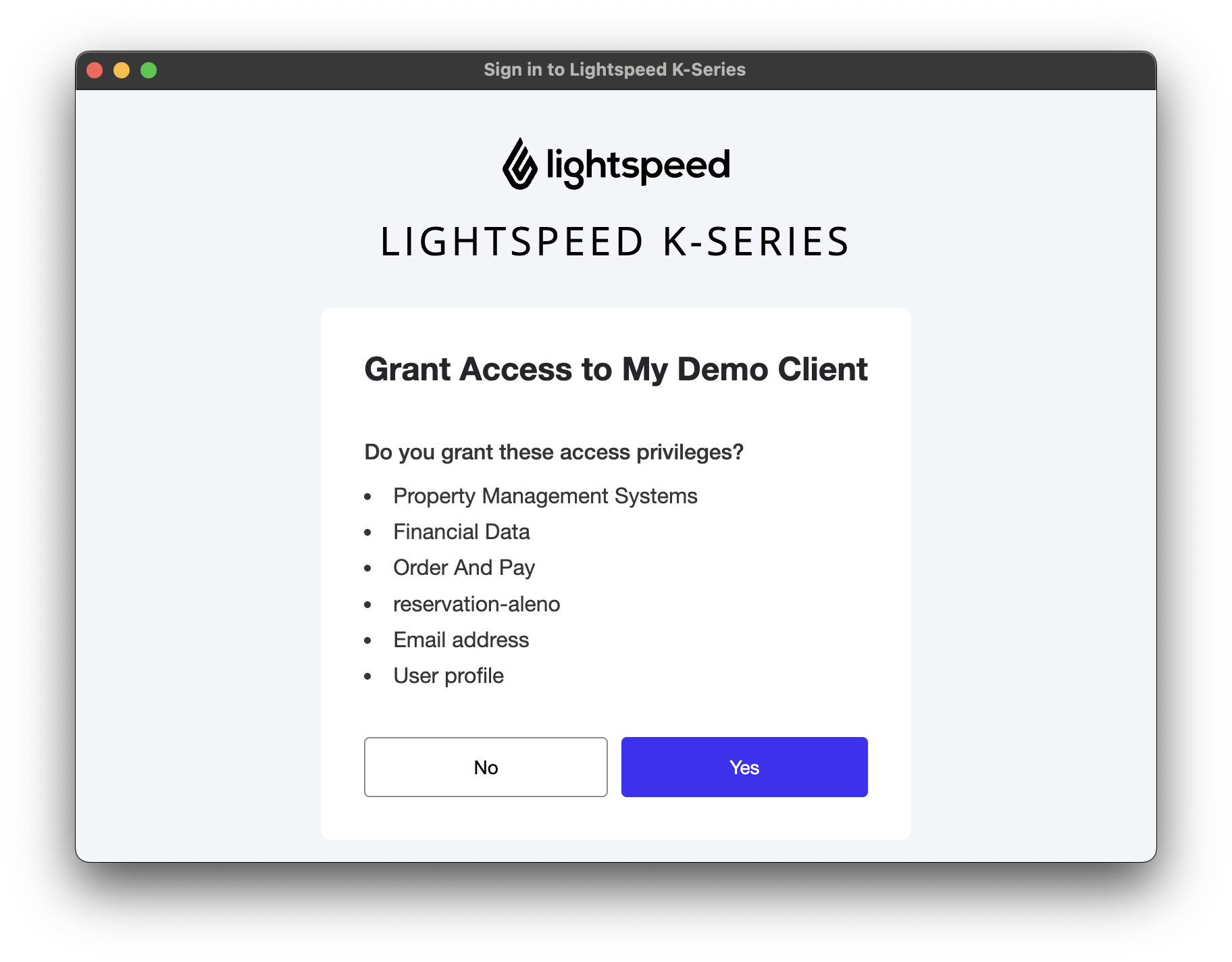
- When the user clicks on this URL, they will be prompted to login to their Lightspeed account.
- Upon successful login, the user must provide consent for the OAuth client to access their data:
2. Token Request
Once the user authorizes the application, a temporary authorization code is passed to your redirect URI as a query parameter. If the state parameter was supplied, it will also be included.
Example Redirect with Authorization Code:
https://your-redirect-uri/?session_state=26a01a6c-9603-4596-a48d-86bbcaa54ef8&iss=https%3A%2F%2Fauth.lsk-demo.app%2Frealms%2Fk-series&code=185a6985-b01a-4833-b289-fad154ea2039.26a01a6c-9603-4596-a48d-86bbcaa54ef8.0bb5b13a-f6a0-4da3-9915-f7633ded915f
The authorization code should be captured from the query parameter in the URL.
The code should then be exchanged for an access and refresh token pair by sending a POST request to the Token URL.
| Environment | Token URL |
|---|---|
| Trial | https://auth.lsk-demo.app/realms/k-series/protocol/openid-connect/token |
| Production | https://auth.lsk-prod.app/realms/k-series/protocol/openid-connect/token |
The client ID and client secret must be base64 encoded and passed as the authorization header in the following format client_id:client_secret.
For example:
DocumentationDemo-5745-4d30-8f1a-bd64511a62ed:fake-client-secret
becomes:
RG9jdW1lbnRhdGlvbkRlbW8tNTc0NS00ZDMwLThmMWEtYmQ2NDUxMWE2MmVkOmZha2UtY2xpZW50LXNlY3JldA==
The following values must be passed in the request body as a form-data payload.
grant_type=authorization_codecode: the code returned to redirect URI.redirect_uri: the redirect URI for the client.
Sample Request:
curl --location --request POST 'https://auth.lsk-demo.app/realms/k-series/protocol/openid-connect/token' \
--header 'Authorization: Basic RG9jdW1lbnRhdGlvbkRlbW8tNTc0NS00ZDMwLThmMWEtYmQ2NDUxMWE2MmVkOmZha2UtY2xpZW50LXNlY3JldA==' \
--form 'grant_type="authorization_code"' \
--form 'code="185a6985-b01a-4833-b289-fad154ea2039.26a01a6c-9603-4596-a48d-86bbcaa54ef8.0bb5b13a-f6a0-4da3-9915-f7633ded915f"' \ (replace with the code returned to redirect URI)
--form 'redirect_uri="https://localhost"' (replace with the redirect URI for the client)
Sample Response:
{
    "access_token": "eyJhbGciOiJSUzI1NiIsInR5cCIgOiAiSldUIiwia2lkIiA6ICJlZk51UFNodDNvUDVDNTM1X0tWYjVhX1B3aHJ6VmNSa25lbUY0ZFNTOTdNIn0.eyJleHAiOjE3NTMzOTEyMzAs...NvbSJ9.u85UrQxvE8tcJqOZIZRlXqtdtw6vTKevsbM3hj5Z_qhi7Z-2d-gr2DXNnNeobRikvaCRt3tPyQhjxBnlJA0mamW5hrAEV1-tEoRF6C59FuAOcVNnj3ZD7NN7_BHlBsAfRaUNU2q0nbnWxRTJItukRsiCOX6ogjBZjI3wF-6xdLdE4UVPMotuR4lcuPIyjJd6sVbg_OJvyGuHCibuDuGBMO7NhuRMQW9OSBT5FpAU_27p98RorB82EHG0tRWlCFvR_VKFvUbi6ESEqKrf97elnrve3pgvHNY8WkuQ8NF2rSsdMsu_-nCdG6w84K9m5RRY6ZFH2DMHQHlftA1Fzx9hGg",
    "expires_in": 1500,
    "refresh_expires_in": 1800,
    "refresh_token": "eyJhbGciOiJIUzUxMiIsInR5cCIgOiAiSldUIiwia2lkIiA6ICJlMTM1NDA1OS0wYmFjLTQwYzUtOWVkZi1hODhmZjI1ZjVjZWEifQ.eyJleHAiOjE3NTMzOTE1MzAsImlhdCI6MT...Jhc2ljIHByb2ZpbGUifQ.gBHNDXCvDmksgTp5fsw5Mg1Wso91JgdG_0C6bIv6isc4HIRPGY8pfXW016QWBeutJG8Ea-PKucJqxj1I_GoOSw",
    "token_type": "Bearer",
    "not-before-policy": 0,
    "session_state": "26a01a6c-9603-4596-a48d-86bbcaa54ef8",
    "scope": "financial-api email profile"
}
3. Refreshing the Token
Refresh tokens can be exchanged for a new access and refresh token pair by sending a POST request to the /token endpoint.
The client ID and client secret must be base64 encoded and passed as the authorization header in the following format client_id:client_secret.
The values must be passed in the request body as an x-www-form-encoded payload. The endpoint will return a new access token and a new refresh token.
Sample Request:
curl \
--header 'Authorization: Basic c29tZV9jbGllbnRfaWQ6c29tZV9jbGllbnRfc2VjcmV0MQ==' \
--header 'Content-Type: application/x-www-form-urlencoded' \
--data-urlencode 'grant_type=refresh_token' \
--data-urlencode 'refresh_token=138fc571-68b0-426d-82d3-b6386421788c' \
--request POST 'https://auth.lsk-demo.app/realms/k-series/protocol/openid-connect/token'
Sample Response:
{
    "access_token": "eyJhbGciOiJSUzI1NiIsInR5cCIgOiAiSldUIiwia2lkIiA6ICJlZk51UFNodDNvUDVDNTM1X0tWYjVhX1B3aHJ6VmNSa25lbUY0ZFNTOTdNIn0.eyJleHAiOjE3NTMzOTEyMzAs...NvbSJ9.u85UrQxvE8tcJqOZIZRlXqtdtw6vTKevsbM3hj5Z_qhi7Z-2d-gr2DXNnNeobRikvaCRt3tPyQhjxBnlJA0mamW5hrAEV1-tEoRF6C59FuAOcVNnj3ZD7NN7_BHlBsAfRaUNU2q0nbnWxRTJItukRsiCOX6ogjBZjI3wF-6xdLdE4UVPMotuR4lcuPIyjJd6sVbg_OJvyGuHCibuDuGBMO7NhuRMQW9OSBT5FpAU_27p98RorB82EHG0tRWlCFvR_VKFvUbi6ESEqKrf97elnrve3pgvHNY8WkuQ8NF2rSsdMsu_-nCdG6w84K9m5RRY6ZFH2DMHQHlftA1Fzx9hGg",
    "expires_in": 1500,
    "refresh_expires_in": 1800,
    "refresh_token": "eyJhbGciOiJIUzUxMiIsInR5cCIgOiAiSldUIiwia2lkIiA6ICJlMTM1NDA1OS0wYmFjLTQwYzUtOWVkZi1hODhmZjI1ZjVjZWEifQ.eyJleHAiOjE3NTMzOTE1MzAsImlhdCI6MT...Jhc2ljIHByb2ZpbGUifQ.gBHNDXCvDmksgTp5fsw5Mg1Wso91JgdG_0C6bIv6isc4HIRPGY8pfXW016QWBeutJG8Ea-PKucJqxj1I_GoOSw",
    "token_type": "Bearer",
    "not-before-policy": 0,
    "session_state": "26a01a6c-9603-4596-a48d-86bbcaa54ef8",
    "scope": "financial-api email profile"
}
Token Lifecycle Best Practices
Maintaining Access
-
Refresh the
access_tokenbefore it expires, using the latestrefresh_token. -
Each refresh returns a new
refresh_token. Always update your stored token. -
Monitor
refresh_tokenlifetime and ensure theaccess_tokenis refreshed before the refresh token expires.
Handling Expiry Times
-
Never hardcode expiry values as they may change due to security updates.
-
Always check the token response for
expires_in(access token lifetime) andrefresh_expires_in(refresh token lifetime) -
Dynamically schedule refreshes based on these values.